Floral Digital Paper2: Precision, Versatility, and Quiet Confidence in Creative Workflows
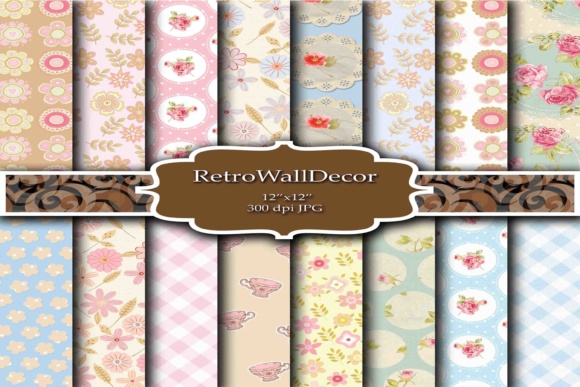
Floral Digital Paper2 isn’t just another set of floral patterns—it’s a response to how digital crafters, designers, and small-business creators actually work today. With 16 high-resolution JPEG files—each 300 dpi, 12×12 inches (3600×3600 px)—it delivers consistency without compromise. No upscaling. No pixelation. No guesswork when printing greeting cards, assembling digital scrapbook kits, or building branded social media templates. That technical reliability matters more than ever as professionals juggle multiple platforms, tight deadlines, and audience expectations for polished, tactile-feeling visuals—even in digital spaces.
Why Resolution and Format Matter More Than Ever
Modern creative workflows no longer treat “digital” and “print” as separate lanes. A wedding planner designs invitations in Canva, exports them for professional letterpress, then repurposes the same floral background as a subtle overlay in an Instagram Story. A teacher creates classroom reward certificates using Rose Digital Paper, then prints them on textured cardstock—and later reuses the Shabby Chic Floral Pattern as a gentle border in a Google Slides lesson deck. In both cases, the file must hold up across contexts. The 3600×3600 px dimension ensures clean scaling down for web use and crisp fidelity at full size for print. JPEG format adds practicality: universal compatibility, fast loading in design apps, and no need for specialized software or color-profile gymnastics.
From Trend to Tool: How Floral Digital Paper Fits Real Shifts
Floral motifs haven’t returned—they’ve evolved. What used to signal nostalgia or femininity alone now communicates warmth, intentionality, and quiet sophistication. Think of the rise of “quiet luxury” aesthetics in branding, or the growing preference for organic textures over hyper-saturated gradients. Shabby Chic Floral Pattern, for example, avoids cliché by balancing faded rose tones with soft grain and subtle paper texture—not overly distressed, not aggressively vintage. It reads as considered, not costumed. Similarly, Floral Background options lean into restrained palettes and balanced negative space, making them viable for corporate newsletters or wellness coaching materials—not just baby shower invites.
This shift reflects broader habits: audiences scroll faster but pause longer for visuals that feel human-made. A hand-drawn rose scan layered over a neutral base builds trust more effectively than a generic stock photo. And because these files are designed as seamless, repeatable 12×12 units, they integrate naturally into tools like Adobe Photoshop, Affinity Designer, Cricut Design Space, and even PowerPoint—no tiling gaps, no alignment headaches.
Practical Use Across Roles—Without Overcomplicating
Different users reach for Floral Digital Paper2 for different reasons—but all benefit from its functional neutrality.
- Small business owners use Rose Digital Paper to unify their Etsy shop banners, product mockups, and printable packaging inserts—keeping brand cohesion without hiring a designer for every asset.
- Educators and nonprofit staff apply Flower Digital Paper as gentle backgrounds for editable PDF worksheets, reducing visual fatigue while maintaining readability—especially important for neurodiverse learners.
- Freelance graphic designers keep the full set as a “speed layer” library: drop in a Shabby Chic Floral Pattern behind client text, adjust opacity to 12%, and instantly elevate a minimalist brochure without starting from scratch.
- Scrapbookers and cardmakers rely on the consistent 12×12 sizing to match physical paper pads—making hybrid projects (digital layout + printed cutouts) predictable and efficient.
No one needs to “learn” how to use these files. They’re built for immediacy—not novelty. That’s why the set includes variations in tone and density: some with tighter clusters for focal elements, others with airy scatter for subtle texture. It’s flexibility rooted in use, not speculation.
The Unspoken Need: Consistency Without Constriction
Many digital paper collections fall into one of two traps: either they’re too narrow (10 near-identical roses on ivory) or too chaotic (clashing scales, inconsistent lighting, mismatched DPI). Floral Digital Paper2 avoids both by anchoring every file to shared constraints—same resolution, same aspect ratio, same intentional restraint in contrast and saturation. That uniformity saves time. When you’re batch-editing 20 social posts or prepping 50 thank-you cards, knowing each background will behave the same way under layer blending modes or export settings reduces cognitive load significantly.
It also supports ethical reuse. Because the files are high-resolution and license-permissive for commercial use (including resale in derivative digital products), creators can confidently build upon them—adding watercolor brushes, custom typography, or foil-effect overlays—without worrying about downstream quality loss or rights ambiguity.
How It Fits Into Broader Creative Infrastructure
Think of Floral Digital Paper2 as infrastructure—not decoration. Like choosing a reliable font family or setting up a smart template system, it’s part of the quiet scaffolding that lets ideas move faster. As cloud-based tools continue to blur the line between amateur and pro workflows (Canva’s Brand Kit, Figma’s community templates, even Google Docs’ improved image handling), having a dependable, cross-platform-ready asset library becomes less of a “nice-to-have” and more of a baseline efficiency requirement.
This is especially true for solopreneurs managing their own marketing: a floral background used consistently across email headers, Pinterest pins, and printed business cards builds recognition faster than switching motifs every campaign. And because the set includes both bold and understated options—from rich burgundy rose arrangements to pale lavender sprigs on oatmeal—you can modulate tone without sacrificing cohesion.
Realistic Expectations, Not Hype
These files won’t replace illustration skills. They won’t automate your entire design process. But they do eliminate one recurring friction point: hunting for a floral element that looks handmade but works technically. That’s valuable when you’re editing photos before a client call, prepping a last-minute workshop handout, or designing a launch sequence across five platforms.
What makes Floral Digital Paper2 stand out isn’t novelty—it’s attention to detail most collections overlook: consistent gamma correction so colors render similarly across devices; slight desaturation to prevent oversaturation when printed on matte stock; and deliberate spacing in pattern repeats to avoid visual vibration at common zoom levels. These aren’t flashy features. They’re the kind of care that shows up in the final output—not the specs sheet.
A Thoughtful Addition, Not a Trendy Gimmick
In a landscape saturated with AI-generated textures and infinite-scroll pattern libraries, there’s growing appreciation for assets that feel intentional rather than algorithmic. Floral Digital Paper2 leans into that. Its floral motifs are scanned from real pressed blooms and hand-retouched—not generated, not stylized beyond recognition. You see the vein structure in the leaves, the slight asymmetry in petal placement, the soft edge where pigment meets paper grain. That authenticity resonates—not as “vintage,” but as honest.
That honesty translates directly to usability. When a blogger uses a Floral Background for their newsletter header, readers subconsciously register care—not just decoration. When a therapist selects a Shabby Chic Floral Pattern for a guided journal PDF, the choice signals calm intention, not decorative excess. That subtlety is increasingly rare—and increasingly valued.
Getting Started Is Straightforward
You don’t need special software to begin. Download the ZIP. Extract the 16 JPEGs. Drag one into Canva, Photoshop, or even Apple Pages. Adjust blend mode if needed (Multiply often works beautifully over light text). Print at full size or scale down for thumbnails—no interpolation artifacts. Save your project. Move on.
That simplicity is deliberate. Creative energy is finite. Tools should conserve it—not consume it. Floral Digital Paper2 respects that. It doesn’t ask you to learn a new workflow. It asks only that you recognize when something works—and let it do its quiet, capable work alongside you.