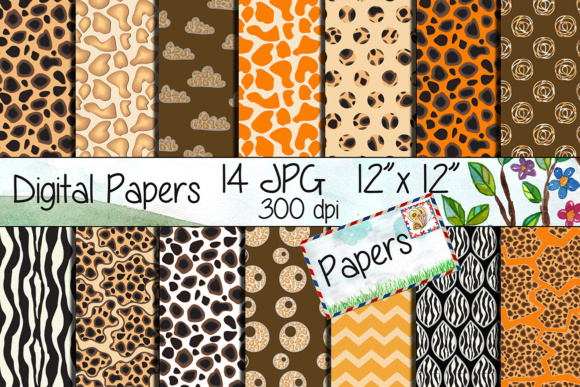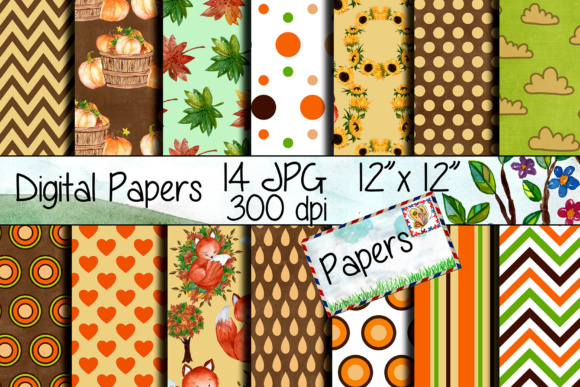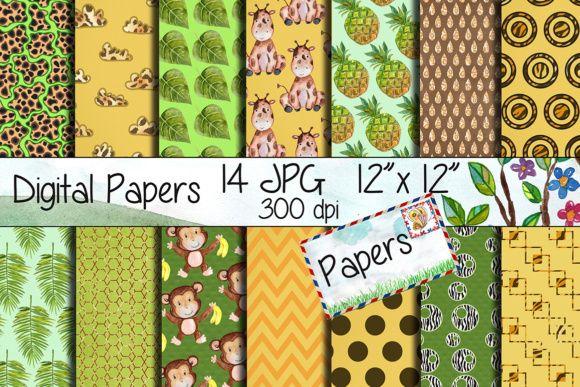
Safari Kraft Digital Paper Pack
The Safari Kraft Digital Paper Pack is a curated collection of 14 high-resolution digital papers designed for creative and professional use. Each paper measures 12 inches by 12 inches and is delivered in JPG format at 300 dpi—suitable for both print and digital applications. The collection features watercolour-inspired textures with a natural, earthy aesthetic, evoking the warmth and organic feel of kraft paper while incorporating soft, hand-painted watercolour elements.
This pack falls within the broader category of digital scrapbook papers—digital assets commonly used across design disciplines. Unlike physical paper, these files are licensed for repeated digital use, meaning they can be integrated into multiple projects without additional cost per use, provided the license terms are followed.
Who Might Consider the Safari Kraft Digital Paper Pack?
Designers, crafters, educators, small business owners, and hobbyists often seek digital papers to support visual consistency and texture in their work. You might be evaluating the Safari Kraft Digital Paper Pack if you’re working on:
- Print-on-demand greeting cards or invitations where tactile texture enhances perceived quality;
- Scrapbooking layouts that benefit from subtle, non-distracting backgrounds;
- Websites or blogs needing cohesive, warm-toned UI elements or blog post dividers;
- Party decorations such as printable banners, cupcake toppers, or photo booth props;
- Educational materials or handmade planners where natural aesthetics support engagement.
Its watercolour-kraft hybrid style offers versatility: it’s grounded enough for professional branding but expressive enough for personal or artistic projects.
Key Benefits to Consider
Consistent resolution and format. All 14 papers are uniform in size (12×12 inches) and resolution (300 dpi), simplifying layout workflows—especially when designing for print. Designers using tools like Adobe Photoshop, Affinity Designer, or Canva can import them directly without resizing or interpolation concerns.
Texture without complexity. The watercolour effect adds visual interest without high-contrast patterns or busy motifs. This makes the papers suitable as subtle backgrounds behind text or layered elements—reducing the risk of readability issues common with overly detailed designs.
Licensing clarity. As a single-download digital product, the pack typically includes a standard commercial-use license (always verify the specific terms at time of purchase). That means you may use the papers in client work, sell printed goods containing them, or incorporate them into digital products—so long as derivative assets aren’t resold as standalone papers.
Tradeoffs and Practical Considerations
Digital papers like those in the Safari Kraft Digital Paper Pack are purpose-built assets—not full design systems. They don’t include coordinating elements such as frames, embellishments, or fonts. If your project requires a complete visual toolkit (e.g., matching borders, icons, or typography), you’ll need to source or create complementary assets separately.
Also, because the pack contains only JPG files, it lacks vector scalability or editable layers. You cannot adjust individual watercolour strokes or recolour elements without raster editing—so flexibility is limited compared to layered PSD or vector-based collections.
Colour fidelity is another practical note: screen displays vary, and printed output depends heavily on paper stock and printer calibration. While 300 dpi supports sharp printing, the warm, muted tones may shift slightly across devices or print runs—particularly on glossy versus matte substrates.
When This Pack Is a Strong Fit
The Safari Kraft Digital Paper Pack aligns well with goals centered on efficiency, cohesion, and organic aesthetic. It’s especially appropriate when:
- You need a small, focused set of high-quality papers rather than a large library;
- Your design system already includes fonts, icons, and layout structure—you’re filling in background texture;
- You value natural, low-saturation palettes and avoid bold, graphic, or modern-minimalist styles;
- You’re producing physical items like wedding stationery or handmade journals where kraft-like warmth reinforces theme or tone;
- You’re working under time constraints and prefer ready-to-use, no-edit-required assets.
In these cases, the pack delivers predictable results without requiring advanced editing skills or extensive asset management.
When Alternatives May Be Worth Exploring
If your needs extend beyond static backgrounds, consider alternatives. For example:
- Vector-based paper packs offer infinite scalability and colour adjustment—ideal if you frequently modify base colours or integrate papers into scalable SVG graphics.
- Multi-format bundles (including PNGs with transparency, layered PSDs, or seamless tile versions) provide more flexibility for web UI, app mockups, or complex compositing.
- Subscription-based design libraries (e.g., Creative Market subscriptions or Envato Elements) give access to thousands of papers—including seasonal, themed, or trend-aligned options—better suited for teams or creators producing diverse content regularly.
- Custom texture creation may be preferable if brand guidelines require precise colour values, unique grain patterns, or proprietary watermarking—though this demands time and technical skill.
Also, if your projects rely heavily on dark-mode interfaces, accessibility contrast, or strict WCAG compliance, test the papers’ legibility with overlaid text before committing—watercolour washes can reduce contrast ratios below recommended thresholds.
Making an Informed Decision
Before acquiring the Safari Kraft Digital Paper Pack, clarify your immediate and near-term use cases. Ask yourself:
- Do I need exactly 14 coordinated papers—or would fewer, or more, better match my workflow?
- Will these papers serve primarily as print backgrounds, or do I also need them for web-responsive layouts (e.g., CSS background tiles)?
- Does my current design stack already support JPG integration—or will I need to convert or re-export assets for compatibility?
- Is the watercolour-kraft aesthetic aligned with my audience’s expectations? (e.g., rustic weddings vs. tech startup branding)
Reviewing preview images at actual size—and testing one paper in your intended software—can reveal how well it integrates before purchase. Many reputable sellers provide zoomable previews or sample downloads; take advantage of those whenever available.
Finally, compare licensing scope. Some sellers restrict use in templates sold on marketplaces like Etsy or Creative Market. If you plan to distribute editable Canva templates or printable planners, confirm whether the license permits that usage tier.
The Safari Kraft Digital Paper Pack is not a universal solution—but for designers seeking a modest, cohesive, print-ready set of warm, textured backgrounds, it represents a practical, focused option. Its value lies not in breadth or customization, but in consistency, resolution, and intentional aesthetic restraint.