Wrinkled Digital Papers: Texture, Versatility, and Real-World Design Power
There’s something quietly magnetic about texture in digital design. A smooth, flat background has its place—but when you want warmth, authenticity, or tactile depth, nothing delivers like Wrinkled Digital Papers. These aren’t just scanned textures or generic overlays. They’re thoughtfully captured, high-resolution assets designed to bring organic realism into your creative workflow—without sacrificing precision or flexibility.
What Makes Wrinkled Digital Papers Stand Out?
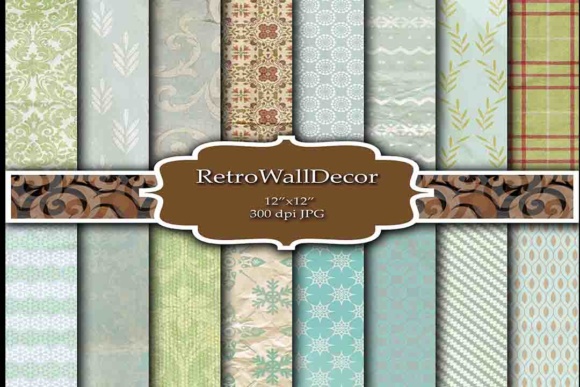
At first glance, they look like real paper—slightly creased, softly folded, gently worn at the edges. But what sets them apart is how intentionally they’re built for digital use. Each sheet in this pack is a 12″ x 12″ JPG file at 300 DPI, meaning it’s print-ready straight out of the download. No upscaling. No pixelation. Just crisp, consistent texture that holds up whether you’re designing a wedding invitation for physical printing or building a layered mockup for Instagram.
The pack includes 16 unique JPG files, each with subtle variations in fold direction, shadow intensity, and surface grain. Some lean toward soft, airy crumples; others offer deeper, more dramatic creases—ideal for bold editorial layouts or vintage-inspired branding. Because they’re delivered as individual JPGs (not layered PSDs), they’re instantly compatible with virtually any tool: Canva, Adobe Photoshop, Affinity Designer, Figma, Procreate—even PowerPoint or Google Slides if you're adding visual polish to a presentation.
Why Texture Matters More Than Ever in Digital Work
We spend hours scrolling past flat, uniform visuals—clean fonts on white backgrounds, minimalist UIs, endless grids of product photos. In that environment, texture becomes a quiet differentiator. It signals care. Craft. Human intention. That’s why designers, crafters, and small business owners increasingly reach for Wrinkled Digital Papers not just for “vintage” projects—but for anything needing grounded, approachable energy.
Think about it: A handmade soap brand uses one of these papers as a background for their Instagram story highlight cover. Instantly, it feels artisanal—not stock-photo sterile. A freelance illustrator drops a wrinkled layer beneath hand-drawn typography for a client’s book cover. The result isn’t just legible—it’s inviting. Even educators building printable worksheets add a subtle paper texture behind student instructions—making digital learning materials feel less screen-bound and more tactile, more memorable.
Real Projects, Real Impact
- Scrapbooking & Memory Keeping: Use a lightly wrinkled base under photo collages or journaling cards. The texture adds dimension without competing with your memories.
- Invitations & Stationery: Layer text over a medium-crease paper for wedding suites or baby announcements—print-ready and emotionally resonant.
- Digital Planners & PDF Kits: Apply a soft-wrinkle background to weekly spreads or habit trackers. It reduces eye strain compared to pure white and feels more personal than a solid color.
- Branding & Social Graphics: Blend a wrinkled paper with a semi-transparent logo lockup for an “unboxing” post or product launch banner—adds instant warmth and credibility.
- Educational Printables: Teachers use these as bases for flashcards, vocabulary posters, or classroom signs—students respond better to textured, low-glare surfaces.
How to Use Wrinkled Digital Papers Without Overcomplicating Things
You don’t need advanced skills—or even Photoshop—to get great results. Here’s how most users start:
- Open your design tool and create a new canvas sized to your project (e.g., 8.5″ x 11″ for a printable, or 1080×1350 px for Instagram).
- Import one of the JPG files as your bottom layer. Resize to fill the canvas—most tools auto-stretch cleanly thanks to the 12″ x 12″ square format.
- Add your content on top: text, photos, illustrations, borders. Adjust opacity (try 90–95% on the paper layer) if you want the texture present but not dominant.
- Export as PDF or JPG—ready for print or web use.
Pro tip: Don’t feel locked into using them as full-page backgrounds. Try cropping a section of a wrinkled paper to use as a border frame, or overlay just the corner folds for a subtle “hand-torn” effect. Because each file is 300 DPI and square, they scale and crop beautifully.
What Designers Actually Look For (and Why This Pack Delivers)
Before downloading any texture pack, savvy creators ask three things:
- Is it resolution-agnostic? Yes—300 DPI means sharp prints at common sizes (5×7, 8×10, 12×12) and crisp on-screen display.
- Does it blend naturally with other elements? Absolutely. These papers avoid extreme contrast or harsh shadows, so type stays readable and photos retain clarity.
- Is it versatile across styles? From rustic to modern-minimal, these textures adapt. A deep-crease paper reads “industrial chic” with bold sans-serif type; a soft-crumple version pairs perfectly with watercolor illustrations or delicate script fonts.
And unlike free texture downloads—which often come with inconsistent lighting, compression artifacts, or watermarks—this pack was created with consistency in mind. Every file shares the same lighting angle, neutral tone range, and naturalistic grain. That means no jarring mismatches when switching between papers mid-project.
Where Wrinkled Digital Papers Fit Into Today’s Creative Ecosystem
They sit at a sweet spot between analog charm and digital efficiency. You get the soul of handmade paper—the slight irregularities, the gentle light play on ridges—without the mess, cost, or time of physical sourcing and scanning. That balance matters now more than ever.
Freelancers building multiple client brands appreciate having a go-to texture library that works across industries: a wellness coach’s workbook, a boutique café’s menu redesign, a local museum’s event flyer—all benefit from that grounded, human-made feel. Meanwhile, hobbyists love that they can enhance Canva templates or Cricut designs in seconds, elevating DIY projects without buying specialty paper or learning complex software.
Even in AI-assisted design workflows, Wrinkled Digital Papers serve as essential “human anchors.” When generating layout ideas with AI tools, designers often feed those outputs into tools like Photoshop and drop in a wrinkled base to reintroduce warmth, variation, and intentionality—countering the sometimes-too-perfect, overly uniform output AI can produce.
Final Thoughts Before You Download
This isn’t about chasing trends. It’s about choosing tools that support your voice—not drown it. Wrinkled Digital Papers won’t fix weak typography or poor composition. But in the right hands, they deepen connection. They slow the scroll. They make digital spaces feel more lived-in, more thoughtful, more real.
If you’ve ever hesitated before hitting “print” because a design felt too cold… or paused mid-scroll because a social post just *felt* warmer than the rest… that’s the power you’re holding. Sixteen carefully crafted, ready-to-use moments of texture—waiting to ground your next idea.
Grab this beautiful paper pack, ideal for tons of projects—whether you're designing for print, screen, or something beautifully in between.