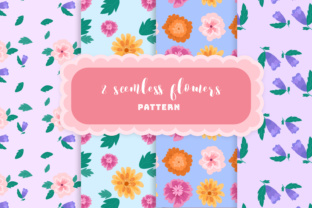
Flowers Seamless Pattern: A Versatile 100-Vector Design Resource for Creative Professionals
Seamless patterns are the unsung heroes of modern design—quietly powering everything from fashion textiles and packaging to website backgrounds and social media graphics. Among the most beloved motifs is the flowers seamless pattern, a timeless, organic, and universally appealing visual language. When paired with technical excellence—like a meticulously crafted set of 100 vector shapes, full Adobe Illustrator editability, intelligent layer organization, and multi-format delivery—it transforms from decorative asset into a strategic creative tool.
What Is a Flowers Seamless Pattern—and Why Does It Matter?
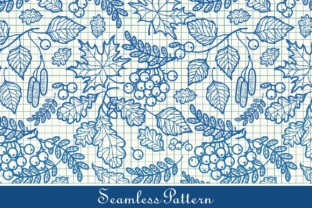
A seamless pattern is a repeating design that tiles infinitely without visible edges or breaks. Unlike standalone illustrations, it’s engineered so that the right edge aligns perfectly with the left, and the top matches the bottom—creating an uninterrupted flow across any surface. A flowers seamless pattern uses botanical elements—petals, stems, leaves, buds, and blossoms—as its core visual vocabulary. These aren’t just pretty; they evoke growth, harmony, renewal, and approachability—qualities brands and creators actively seek.
But not all floral patterns are created equal. Many free or low-cost downloads suffer from inconsistent scaling, overlapping paths, missing anchors, or poorly named layers—making edits time-consuming or impossible. That’s where purpose-built resources like this 100-vector flowers seamless pattern stand apart: designed not just to look beautiful, but to function flawlessly in real-world workflows.
Why 100 Vector Shapes Make a Real Difference
The number “100” isn’t arbitrary—it reflects thoughtful curation and scalability. Each of the 100 vector shapes represents a distinct, high-fidelity floral element: a daisy head, a trailing vine segment, a stylized peony petal, a minimalist fern frond, or a geometric marigold silhouette. Because they’re built as vectors—not raster images—they retain crispness at any size, from a business card icon to a billboard backdrop.
More importantly, having 100 individual components means you’re not locked into one rigid layout. You can:
- Customize density: Add or remove blossoms to adjust visual weight for print vs. digital use.
- Swap color palettes instantly: Apply global swatches across dozens of shapes with one click.
- Recompose arrangements: Rearrange stems and blooms to match seasonal campaigns (e.g., cherry blossoms for spring, sunflowers for summer).
- Create derivatives: Isolate single elements to build new icons, logos, or monograms.
Fully Editable in Adobe Illustrator: Beyond “Open and Use”
“Editable” is often used loosely—but here, it means truly editable. Every shape is constructed with clean Bézier paths, no embedded rasters, no ungrouped compound paths hiding complexity. All anchor points are optimized, and strokes are converted to outlines where appropriate—so nothing breaks when you scale, rotate, or recolor.
This level of fidelity matters because:
- Designers save hours: No need to redraw petals or fix misaligned nodes.
- Brands maintain consistency: Marketing teams can adapt the pattern to match evolving brand guidelines without rehiring illustrators.
- Educators teach best practices: Students learn vector hygiene—layer naming, grouping logic, and non-destructive editing—by working with well-structured files.
Well-Organized & Properly Named Layers: The Secret to Scalable Workflows
Ever opened an Illustrator file only to find “Layer 1,” “Layer 2,” and “Group Copy 7”? This resource eliminates that frustration. Layers are logically grouped and clearly labeled—for example:
- “Base_Tile_Area” — the invisible bounding box defining the repeat unit.
- “Flowers_Main” — primary blossoms (roses, tulips, lavender clusters).
- “Foliage_Support” — stems, leaves, and vines that guide the eye.
- “Accents_Fine” — delicate elements like stamens, dewdrops, or subtle vines.
This structure isn’t just tidy—it enables precision. Want to mute background foliage while highlighting foreground blooms? Simply toggle visibility or adjust opacity per layer. Need to export only the floral elements for a logo variant? Select and isolate the “Flowers_Main” group in seconds.
What’s Included: AI Sprite File, EPS, PNG—and Why Format Variety Matters
The package delivers three essential formats inside a single ZIP archive:
- .AI (Adobe Illustrator): The master editable file—your source of truth for customization, animation prep, or print production.
- .EPS: A legacy but still vital format for compatibility with older prepress systems, large-format printers, and some CAD or embroidery software.
- .PNG: High-resolution (300 DPI), transparent-background raster versions—ideal for quick web use, presentations, mockups, or platforms that don’t support vectors (e.g., certain CMS editors or email builders).
Having all three ensures flexibility across tools, teams, and timelines. A freelance designer might tweak the .AI for a client’s stationery suite, while a social media manager drops the .PNG into Canva for an Instagram story—no friction, no quality loss.
Real-World Applications: Where This Pattern Adds Value
This isn’t just another download—it’s a productivity multiplier across industries:
- Fashion & Textiles: Print designers use the seamless tile to develop fabric repeats for scarves, dresses, or upholstery—adjusting scale and spacing to suit silk vs. cotton weaves.
- Packaging & Branding: CPG brands apply subtle floral patterns to eco-friendly product boxes, reinforcing natural, artisanal positioning without overwhelming the label hierarchy.
- Digital Products: UI/UX designers embed lightweight vector tiles as subtle background textures in dashboards or onboarding flows—adding warmth without sacrificing performance.
- Education & E-Learning: Teachers create printable worksheets with themed borders; students use individual flower vectors in science projects about plant anatomy or pollination.
- Small Business Marketing: Cafés, florists, and wellness studios customize colors and layouts to reflect their unique voice—then deploy across Canva templates, Mailchimp banners, and Etsy shop headers.
Dispelling Common Misconceptions
Before wrapping up, let’s clarify a few assumptions:
- Myth: “Seamless = boring.” Reality: With 100 editable shapes, variation is built-in—you control rhythm, contrast, and focal points.
- Myth: “Vector = only for designers.” Reality: Anyone using Canva, PowerPoint, or even Google Slides can import the .PNG or copy-paste SVG-ready elements from Illustrator.
- Myth: “One pattern fits all projects.” Reality: This set is intentionally versatile—but its true power emerges when you adapt it. Its value lies in your ability to make it yours.
Final Thoughts: More Than Decoration—A Foundation for Intentional Design
A flowers seamless pattern backed by 100 vector shapes, full Illustrator editability, smart layer organization, and multi-format delivery isn’t just convenient—it’s a commitment to craft. It respects your time, honors your creative intent, and grows with your skills. Whether you’re launching a boutique brand, teaching visual literacy, or building a portfolio piece, this resource meets you where you are—and helps you go further.
In a world saturated with generic assets, choosing a thoughtfully engineered, educationally transparent, and technically robust pattern isn’t just practical—it’s a quiet act of professional respect—for yourself, your collaborators, and the people who’ll ultimately experience your work.