Monstera Pattern: Versatile Vector Design for Creators
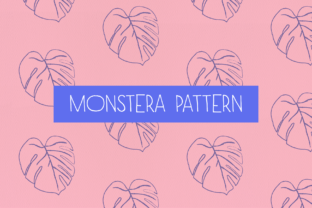
There’s a reason the Monstera deliciosa leaf has become a design staple—it’s bold, organic, and instantly recognizable. But not all Monstera patterns are created equal. This Monstera Pattern isn’t just a photo or raster image; it’s a meticulously crafted vector built from a real leaf, optimized for flexibility, scalability, and creative control.
What sets this apart is intentionality: every fenestration (those signature splits), every curve, and every vein was translated into clean vector paths—then thoughtfully repeated to form a seamless, surface-ready pattern. That means no pixelation, no distortion, and zero quality loss—even when scaled to cover an entire billboard or shrunk to fit a social media icon.
Why Designers Reach for This Monstera Pattern
This isn’t decorative filler. It’s a functional design asset engineered for real workflows. The six included pattern swatches aren’t static—they’re fully editable in Adobe Illustrator. Double-click any swatch in your Swatches panel, tweak spacing, rotation, color balance, or even adjust individual leaf strokes using custom brushes—and watch the entire pattern update live.
That level of responsiveness saves hours. Instead of rebuilding patterns from scratch for each client or project, you adapt one intelligent file. Need a subtle tone-on-tone background for premium stationery? Adjust opacity and shift hue. Want high-contrast drama for a music album cover? Swap in deep emerald and charcoal, then tighten the repeat grid. It’s design agility, built in.
Where This Monstera Pattern Fits—And Why It Sticks
Think beyond wallpaper and Instagram posts. This pattern thrives where visual cohesion meets practical utility:
- Branding & Packaging: Use it as a tactile texture on product labels, business cards, or unboxing inserts—especially for wellness, botanical, or lifestyle brands aiming for organic authenticity without cliché.
- Digital Interfaces: Apply it as a subtle animated screensaver for kiosks, a soft background layer in presentation decks, or a responsive hero section that scales cleanly across devices.
- Educational & Publishing Materials: Teachers use it to frame science lesson headers about plant biology; publishers embed it into ebook chapter dividers or printable worksheets—adding visual rhythm without distraction.
- Merchandise & Surface Design: Print it on fabric for tote bags, scarves, or ceramic mugs. Because it’s vector-based, registration stays crisp even on curved surfaces or irregular seams.
- Mockups & Client Presentations: Drop it into layered PSD mockups—phone cases, notebooks, wall art—to show how a brand element translates across physical touchpoints, fast.
It works because it balances character with neutrality. The leaf shape carries natural warmth and sophistication, but its clean lines and consistent spacing keep it modern—not kitschy. It doesn’t shout; it supports.
Real-World Use Cases You Can Start Today
A freelance graphic designer used the Monstera Pattern to refresh a local café’s seasonal menu system. Instead of generic green motifs, they applied a muted sage-and-cream variant across menu boards, napkin prints, and loyalty cards—creating continuity without repetition. Customers noticed the “cohesive feel,” not the pattern itself. That’s effective design.
An indie musician chose the darkest swatch—deep forest green over black—for their vinyl album cover. They extended the pattern onto the inner sleeve and digital streaming thumbnails. Fans began tagging posts with #MonsteraVibes—not because the band named it that, but because the visual language felt intentional and immersive.
A university communications team deployed a light gray-on-white version as a watermark behind PDF reports and slide templates. It added quiet texture and brand recognition without interfering with readability—a small detail that elevated perceived professionalism.
What’s Inside the Package—and What That Means for Your Workflow
You receive two essential components—no bloat, no unused assets:
- Six Illustrator Pattern Swatches: Each pre-configured for different densities and moods—tight repeats for textiles, airy versions for backgrounds, and directional variants for motion graphics or scroll effects.
- Six Matching PNG Files: High-res, transparent-background renders of each swatch, ready for immediate use in Canva, Figma, PowerPoint, or platforms that don’t support AI patterns natively.
No fonts, no extra vectors, no “bonus” files you’ll never open. Just what you need, optimized for speed and compatibility.
And if you’re working in an older version of Illustrator—say, CC 2019 or earlier—just send a quick message. The creator will supply backward-compatible files, no questions asked. That kind of support isn’t standard. It reflects how this Monstera Pattern was built: for people who ship work, not collect assets.
Practical Tips Before You Implement
Start simple. Try one swatch at 15% opacity as a background layer before committing to full coverage. See how it interacts with your typography and imagery—some patterns gain strength through restraint.
Remember: contrast matters. A dense Monstera Pattern can overwhelm thin fonts or delicate photography. Pair it with strong sans-serifs or bold serif headlines for balance. If using for print, check your RIP settings—vector patterns render more predictably than raster tiles, but always soft-proof first.
And don’t overlook color psychology. While green reads “natural” or “calm,” shifting toward teal adds modernity; leaning into olive brings earthiness; adding gold foil accents (in print) introduces luxury. The pattern adapts—your intent guides it.
This Monstera Pattern doesn’t replace your creativity—it amplifies it. It removes technical friction so you spend less time wrestling with alignment and more time solving visual problems. Whether you’re launching a Shopify store, designing a conference identity, or illustrating a children’s book, it’s a reliable, scalable, human-centered tool—not just another download.
When design assets feel like extensions of your process—not obstacles—you ship better work, faster. That’s the quiet advantage of starting with something built right.